• Support
  • Login
  • Solutions

    Digital Scheduling

    A core workforce management solution for rota planning that simple and smart.

    Explore >
    Add Ons
    • Digital Scheduling A core workforce management solution for rota planning that’s simple and smart.
    • Add-Ons
    • Forecasting See tomorrow today with predictive insights into your demand spikes.
    • Labour Modelling Connect demand forecasts into precise, deployable staff rotas.
    • Auto Scheduling Generate optimised, compliant, fair schedules in seconds — not hours.
    • AI Insights Ask questions in natural language and get instant, AI-backed answers without BI backlogs.
    • HR powered by ELMO Discover a connected HR and workforce platform with ELMO solutions.

    Take a self guided product tour

    Start >
    Book a demo Speak to a Geek
  • Features
    Features
    • View All Features View all of our workforce management solutions
    • Shift Planning Plan shifts using our digital scheduling software
    • Mobile App - Employee Engagement Improve communication and create a transparent approach to scheduling for your workforce.
    • Clocking In/Out Manage employee schedules and clock in and out for shifts
    • Leave & Absence Management Request, approve, and track leave and absence for your workforce from one solution.
    • Timesheet Tracking & Attendance Manage hours scheduled vs hours worked and automatically create timesheets to send to payroll
    • Insights & Reporting Customisable reporting to track the workforce metrics that matter.
    • Integrations Integrate our workforce management solutions and schedules into other tech seamlessly

    Watch a 6 minute demo

    Watch >
    Book a demo Speak to a Geek
  • Industries
    Industries
    • View All Industries View all of our industries
    • Retail Helping retailers spend 1:1 time with customers - not the rota.
    • Hospitality Serving the hospitality industry with first-class rotas.
    • Entertainment & Leisure Game-changing scheduling as engaging as your business.
    • Healthcare Whether you're a private service or large trust, Rotageek is here to help.
    • Care Homes Working with care and nursing homes to provide optimal rota solutions.
    • Other Sectors Helping a host of workforces to meet fluctuating demand.

    Scheduling & Workforce Management RFP Template

    Download >
    Book a demo Speak to a Geek
  • Customer Stories
  • Resources
    Resources
    • Free Downloads From white papers to webinars, we've got you covered.
    • Blog All the latest industry insights from the Geeks.
    • Latest Webinar - Watch On Demand What workforce planning leaders can change now
    • Event - How retailers are fast-tracking WFM Watch the panel sessions from our annual customer event

    Scheduling & Workforce Management RFP Template

    Download >
    Book a demo Speak to a Geek
  • About Us
    About Us
    • Why Rotageek? What makes us a different type of scheduling solution?
    • Moving to Rotageek Live your best scheduling life when you move to Rotageek.
    • Partners Our partner ecosystem to supercharge your scheduling solution.
    • Our Story The Rotageek story so far.
    • Meet The Team The Geeks behind the scenes.
    • Careers Meet the team and become a rota geek.
    • Contact Us Get in touch and speak to a geek.

    Watch a 6 minute demo

    Watch >
    Book a demo Speak to a Geek
  • Product Tour
  • Book a Demo

LEAVE & ABSENCE MANAGEMENT SOFTWARE

Leave & Absence Management

Request, approve and track leave and absence for your workforce from one leave management solution.
Leave solution image NEW

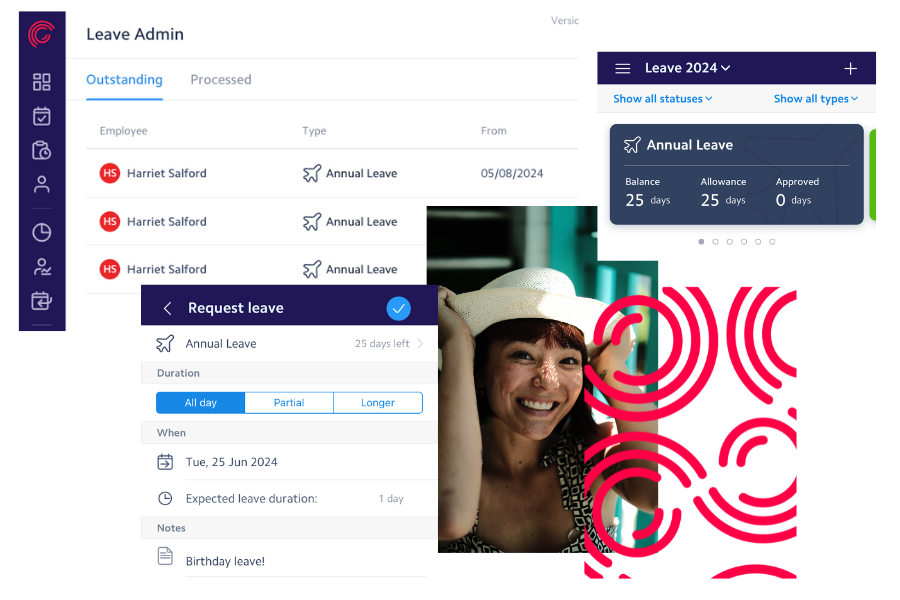
Digitising your leave and absence management not only boosts your employee experience, but it saves your managers precious scheduling and rostering time. For your workforce, having digital tools to request leave on the go, whenever suits them, will result in staff who are engaged in their working lives. And for managers, they’ll never have to worry about scheduling staff who aren’t available, as approved leave requests or absences are automatically added as constraints into our digital scheduling and autoscheduling solutions.

With our intuitive absence management interface, all types of leave can be set, requested and approved, including custom configured allowances that are unique to your organisation. Enhanced maternity or paternity leave, birthdays off or new pet leave, anyone?

And with real-time status of approvals, rejections or notes, you’ll have a clear audit trail that keeps everyone in the loop, even with the most complex or sensitive leave and absence requests.

Included with
Digital Scheduling Autoscheduling Forecasting
Leave and Absence

Smart Leave & Absence.

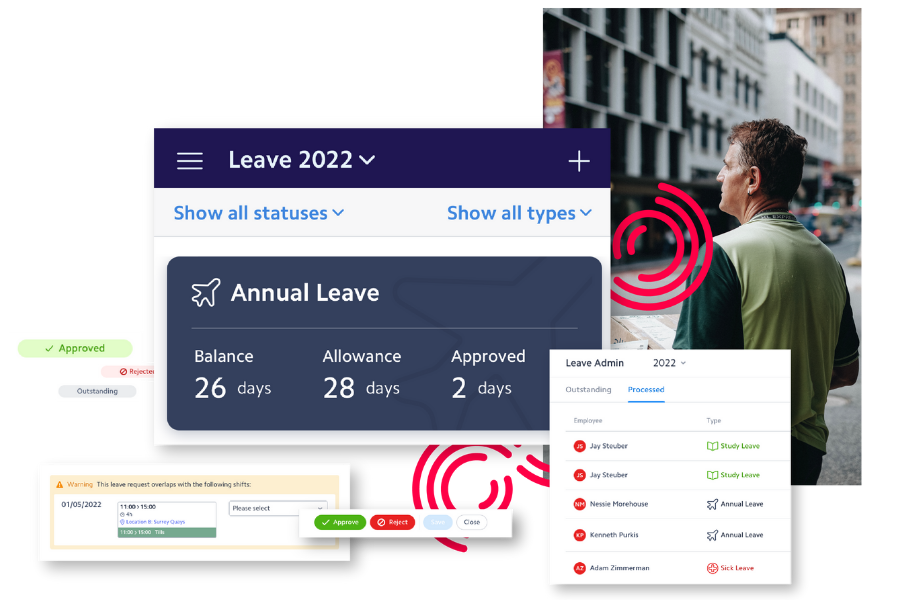
All types of leave are configurable to your organisation's needs, as well as ensuring you remain compliant with statutory requirements. Configure rules like percentages of certain skilled staff can’t be on leave at any given time, or key dates when employees can't take a holiday. Leave can only be authorised if there is sufficient balance so no need to do manual checks on allowances or additional calculations. And when used with Autoscheduler, optimised schedules are produced with the right skilled staff, reflecting approved requests and return to work dates.

Leave and absence management

Reduce shift gaps with ease.

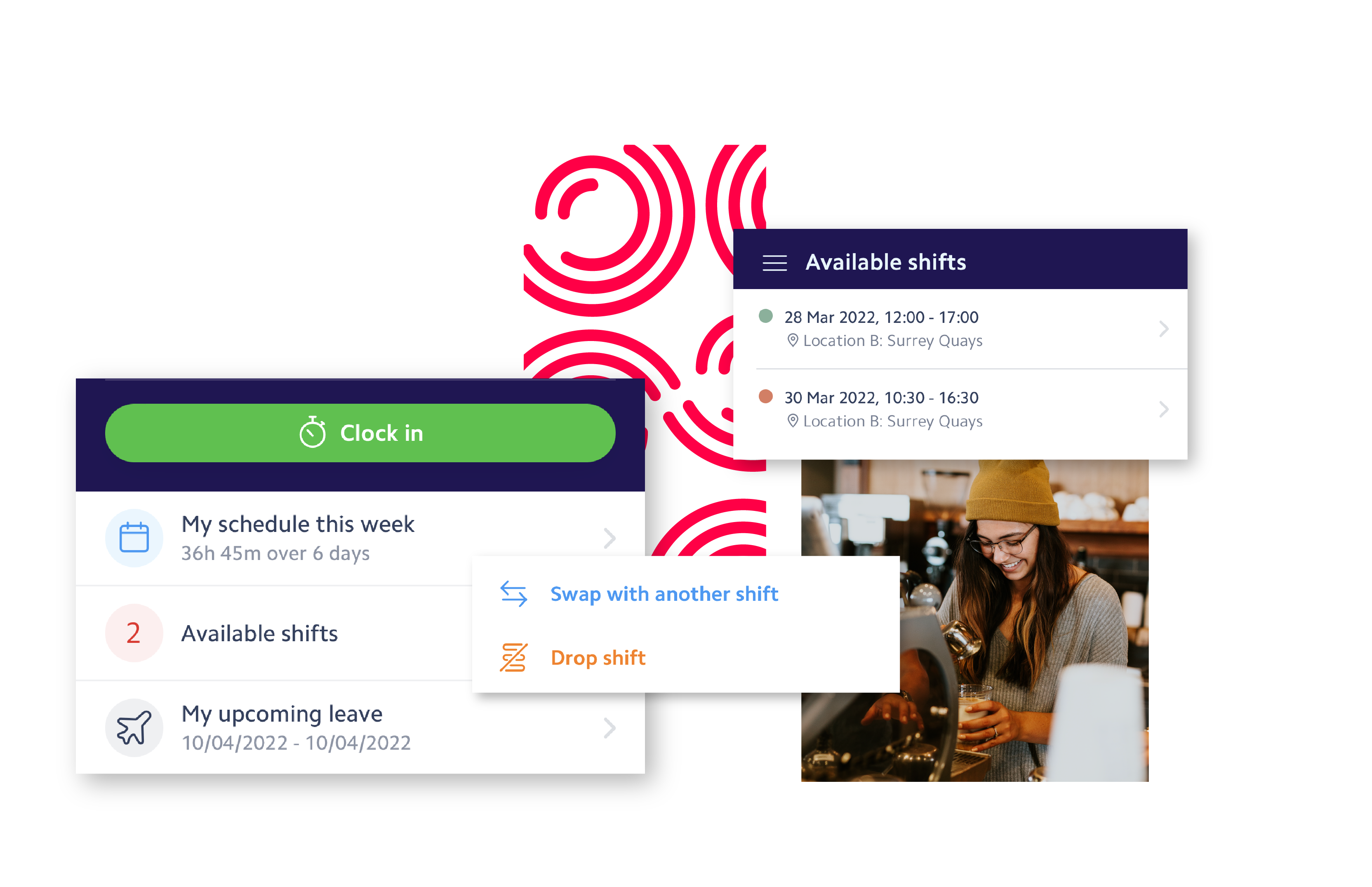
If a member of staff is sick or doesn't show up for work, find someone to cover their shift with one click using our leave management software. With real time attendance views, managers can make sure their scheduled staff have clocked in for work or recorded an absence, and find replacements without the need for last minute frantic calls, texts and emails.
leave absence process

Efficient Leave & Absence Processes.

Staff can easily see their holiday allowance and request leave through the app. With options to attach documents, add detailed notes and communicate with managers, your workforce will always have the latest information. Managers can easily see all leave requests outstanding through the absence management dashboard, with additional views on who else has approved leave at the same time.

absence and leave reporting

Absence Insights.

With a central view on leave and absence status for all workers, managers can easily make interventions as needed. Reporting functionality means that managers can better analyse absences by job function or location, and plan for the future. KPIs such as sick pay, absenteeism, and unauthorised absences are easily identifiable for reporting upwards.


Benefits of an Absence Management System.

Request leave
Request leave
The power to request leave is in the palms of your employees. They’ll own their working schedule with their remaining or approved leave balance shown in the app, giving them the control to plan there leave as needed.
Scheduling Syncs
Scheduling Syncs
Approved leave is automatically reflected in the schedules or rotas you create. Used with digital scheduling, you won’t be able to add an employee into the schedule if they have approved leave of sickness on any given day, and Autoscheduler optimises your rotas with these constraints in mind.
Approvals
Approvals
Easily view all your employee leave requests yet to be processed from the dashboard. Launch a dialogue box to view details of the request, edit as necessary, communicate with the employees or approve/reject it.
Leave Warnings
Leave Warnings
If an employee's leave request overlaps with another team member's approved holiday or breaches company policy, a warning or error will be shown to help the manager decide whether to approve or reject the request. 
Reporting
Reporting
Track absenteeism, leave taken, spot patterns or trends and cross compare locations for continual scheduling improvements with powerful leave and absence reporting. Our reports makes it simple and quick to view the stats you need.
Security
Security
Be assured that our enterprise-grade ISO-certified security and systems that are GDPR compliant and ISO 27001 and ISO 9001 certified, will keep you and employees safe. Our platform is resilient as it is efficient, including single sign-on capability and award-winning support.
Explore more features

FAQs

  • How long does it take to implement Rotageek's leave and absence management software across multiple locations?
    Rotageek's implementation is measured in weeks, not quarters. The implementation approach is discussed before contract signature, and an expert-led, agile process takes you from kick-off to location-wide go-live quickly. Customer examples confirm this speed: Lakeland had its first stores live in one month, and Dune rolled out across 70+ locations in two months.
  • Is the Rotageek absence management app easy to roll out to our frontline workforce?
    Yes. The Rotageek mobile app is available on iOS and Android, giving employees self-service access to request leave, view balances and receive real-time approval updates from their phone. Push notifications and calendar sync keep staff informed without extra effort. Rotageek consistently achieves 10/10 user ratings for ease of use.
  • Can Rotageek's leave management system integrate with our existing payroll and HR software?
    Yes. Rotageek integrates seamlessly with HR/HCM, payroll, BI, appointment booking, task management and other platforms via live API, SFTP flat file or SSO. Confirmed partners include IRIS Cascade for HR and payroll, RetailNext for demand data, and Locum's Nest for NHS bank staffing. Approved timesheets can be exported directly to payroll.
  • How easy is it to configure custom leave policies, such as enhanced maternity or new pet leave, during setup?
    All leave types are fully configurable to your organisation's needs. You can set up custom allowances like enhanced maternity or paternity leave, birthdays off, or new pet leave alongside statutory requirements. Rules such as black-out dates, maximum staff off at one time, and auto-approval within predefined criteria can all be configured during onboarding.
  • Will migrating our absence management to Rotageek disrupt our current scheduling processes?
    No. Rotageek is designed for a smooth, low-risk transition led by experienced implementation experts, not slide decks. Approved leave automatically syncs with digital scheduling and auto-scheduling, so managers cannot accidentally schedule staff who are on approved leave or absent. This means your scheduling processes improve rather than break during the move.
  • How secure is our employees' sensitive absence and medical data within the Rotageek platform?
    Rotageek is GDPR compliant and holds both ISO 27001 (Information Security) and ISO 9001 (Quality Management) certifications. The platform includes enterprise-grade 24/7/365 infrastructure monitoring, SSO support, two-stage timesheet verification and secure data transfer via API, FTP or encrypted file exchange.
  • Does digitising our leave tracking require intensive manager training?
    No. Rotageek's absence management dashboard is intuitive and designed to reduce admin, not add to it. Managers can view all outstanding leave requests, approve or reject with a dialogue box, and communicate with employees from one screen. Targeted training sessions are provided during onboarding, and ongoing support is included at no extra cost, with an average response time under 39 seconds.
  • How does Rotageek's absence software help reduce shift gaps when an employee calls in sick?
    When a staff member calls in sick, managers can broadcast the gap shift to qualified colleagues with one click using Rotageek's leave management software. Real-time attendance views show whether scheduled staff have clocked in or recorded an absence, removing the need for last-minute calls, texts and emails. Ashford & St Peter's Hospital Trust saw 90% of vacant shifts filled using this approach, up from just 4%.
  • What is the ROI of moving from manual holiday tracking to an automated leave management system?
    Automating leave and absence management with Rotageek delivers measurable returns. Customers report an 80% reduction in manager time spent on administration and 13% weekly savings on overtime and labour costs. Approved leave syncs directly into scheduling, eliminating manual checks on allowances and preventing overstaffing or understaffing. The result is fewer errors, less admin and more time for managers to focus on their teams.
  • What are the main functions of time and attendance tracking software?

    Time and attendance tracking software helps you to monitor the working activity of your employees. Initially adopted by businesses in the service sector, it is now used by a huge range of companies across the world. As the complete cloud-based workforce management solution Rotageek enables the in-depth analyses of attendance patterns and time spent on specific projects.

    Time and attendance tracking software can also be used to:

    • Enable your staff to clock in and out with ease
    • Keep track of who is in attendance across multiple locations
    • Rapidly approve timesheets in accordance with agreed schedules
    • Export and transfer verified timesheets to payroll.
  • Does time and attendance tracking software help in terms of workforce management?
    There’s no reason to worry about employee resentment or tension if you share the reasons and benefits of implementation in advance. With integrated features such as photo capture and geo-location, Rotageek allows for full visibility, limiting the risks of dishonesty and disputes. Turning employee tension into retention by empowering staff to control their own schedules, knowing that they’ll be paid fairly for their time.
  • Which industries is time and attendance tracking software suited to?
    As mentioned, time tracking software has been adopted by a whole host of businesses across various sectors. It’s used to monitor staff in retail premises and hospitality venues, to doctors in healthcare settings.You can even use our software to keep track of employees working on a remote basis.
  • How easy is it to create timesheets with time and attendance tracking software?
    With user-friendly clocking-in and out functionality, our time and attendance tracking software encourages staff to be present and punctual. Handy push notifications can be set to remind employees of upcoming shifts and the need to clock in and out. Produce timesheets with ease, as our software draws on data from agreed and completed schedules.
  • Can payroll be integrated with time and attendance tracking software?
    Rotageek enables the everyday monitoring of employee activity and approval of timesheets for quick and accurate payroll processing. Organisational rounding rules can be applied for the simplification of complex calculations, with timesheets being submitted upon passing a two-stage verification process. Employees can be assured of timely and accurate payments, with payroll data being transferred through live API, FTP, or CSV report - the choice is yours.
  • How secure is time and attendance tracking software?
    Rotageek safeguards the data of employees and the wider organisation, making our time and attendance tracking software as secure as it is compliant. As part of the complete workforce management package, our software is GDPR compliant and ISO 27001 and ISO 9001 certified. Two-stage timesheet verification minimises the risk of issues such as time theft, mistakes, or falsified hours/pay.
No FAQs match your search.
pattern
Book a demo

Ready to talk?

Chat to our scheduling experts for advice or a no-obligation demo.

Rota Geek Limited is a company registered in England and Wales with the company number 06783810 and registered address of Unit 6 & 7, Foundry Court, Foundry Lane, Horsham, West Sussex, England, RH13 5PY


  • Google Play
  • Apple App Store
  • Quick links
  • Log In
  • Book a Demo
  • Help Centre
  • Products
  • Digital Scheduling
  • Autoscheduling
  • Forecasting
  • Company
  • Our Story
  • Careers
  • Blog
  • Privacy Policy
© 2026 Rotageek. All rights reserved.
  • Cookie Policy
  • Privacy Policy