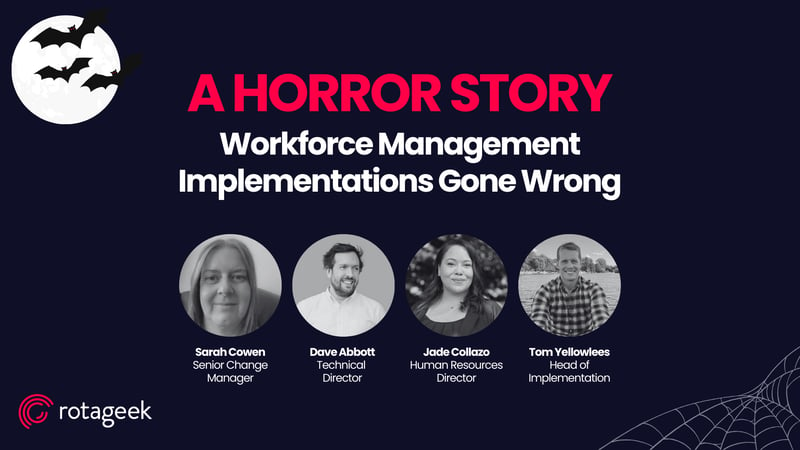
Implementing a workforce management (WFM) system can be a daunting task, one filled with the potential for both failure and success. In a recent Rotageek webinar, we facilitated a discussion with industry experts who shared stories of WFM implementations gone wrong. These real-life challenges illustrated the need for careful planning, clear communication, and thoughtful execution. Here, we summarise the speakers’ key insights and provide actionable advice on turning potential “horror stories” into successful WFM rollouts.
Preparing Early and Engaging Stakeholders
A major reason WFM implementations can struggle is insufficient early-stage planning and limited engagement with key stakeholders. “One of the biggest issues we see is when organisations think they can just plug in a WFM system and everyone will instantly understand how it works and why it’s beneficial,” said one speaker. When teams aren’t fully involved from the start, resistance becomes more likely, as employees often feel unprepared for the changes that come with new tools.
Involving stakeholders early can make a tremendous difference, as it builds engagement and surfaces valuable insights into each department’s specific needs. As another speaker noted, “It’s critical to bring people on board from the beginning. If they understand the ‘why’ behind the change, they’re much more likely to support it.” By opening channels of communication with all affected departments, organisations can foster a smoother transition to the new system, ensuring employees feel involved and heard.
Comprehensive Training for All Users
An effective training programme is essential for any successful WFM rollout. The speakers highlighted that organisations often assume employees will naturally adapt to new tools, but this expectation can lead to frustration and decreased productivity if not properly managed. “Training is everything,” one panellist remarked. “Without the right guidance, people can get overwhelmed and may even revert to old methods, which defeats the purpose of the system entirely.”
Effective training should be tailored to different user levels and provide ongoing support, such as helpdesks and refresher sessions. “We’ve seen that well-trained teams adopt the system far more easily,” another speaker explained. Ensuring continuous support helps employees feel confident, making them more likely to engage fully with the system and incorporate it into their daily routines.
Managing Expectations and Setting Realistic Goals
Another essential aspect of WFM success is managing expectations. Organisations often approach new systems with high hopes, sometimes expecting them to resolve all workforce challenges immediately. “It’s important to be realistic about what a WFM system can and cannot do,” a speaker cautioned. Overestimating the capabilities of the software can lead to disappointment if the system doesn’t deliver on every need immediately.
Instead, the experts recommended setting clear, focused goals for what the WFM system should achieve. “Start with the basics and focus on core issues first,” advised one panellist. “You can always expand once you’re confident the system is meeting those initial needs.” By setting achievable goals, organisations avoid disappointment, giving teams a clear sense of progress and success as the system rolls out.
Balancing Customisation with Usability
The speakers also discussed the importance of balancing customisation with simplicity. While customising a WFM system to fit specific organisational needs is valuable, excessive modifications can make the system cumbersome and difficult to use. “Customisation should enhance the user experience, not complicate it,” said one speaker. “We’ve seen cases where too much customisation turned the system into a maze that users struggled to navigate.”
The experts advised focusing first on core functionalities that serve the majority of users, only adding customisation where it significantly benefits productivity. “If the system addresses the main needs well, that’s already a win,” one panellist explained. A straightforward system reduces user confusion and increases adoption rates, ensuring that the WFM tool becomes an asset rather than a burden.
Testing and Piloting for a Smooth Rollout
Testing is another crucial step in the implementation process. In their eagerness to deploy, some organisations rush through testing, which can lead to significant problems post-launch. “Skipping testing is like driving a car without knowing if the brakes work,” one speaker emphasised. Pilot programmes, they explained, are invaluable in allowing teams to identify and address potential issues in a controlled environment before full-scale deployment.
Testing provides real-world insights, enabling adjustments based on user feedback. “Running a pilot programme may take time, but it’s a lot cheaper than fixing major problems after the rollout,” another expert advised. Investing in a thorough testing phase may require resources, but it ultimately prevents costly disruptions and enhances overall system performance when it goes live.
Post-launch Communication and Feedback Channels
After launch, ongoing communication and feedback channels are essential for continued success. “Even the best implementations have teething problems,” said one speaker, “but if you catch those issues early, they’re much easier to fix.” Creating spaces for users to voice concerns or suggest improvements keeps the system evolving in response to user needs.
Regular check-ins, surveys, and Q&A sessions provide employees with the opportunity to share feedback, which can then be used to refine and improve the system. As one expert observed, “It’s not just about the initial launch—it’s about making sure the system stays relevant and effective over time.” By maintaining open channels for feedback, organisations signal that they value user input and are committed to long-term success.
Fostering a Positive Culture Around WFM Tools
A positive workplace culture around WFM systems is one of the most effective ways to encourage adoption and success. “When employees see that the system makes their jobs easier, they’re much more enthusiastic about using it,” explained one of the panellists. Celebrating small wins—such as improved scheduling efficiency or productivity gains—can help reinforce the system’s benefits and motivate employees.
The speakers agreed that recognising achievements, however small, can shift perceptions. “People need to feel that the system is working for them, not just something being imposed on them,” added another speaker. This positive reinforcement encourages employees to engage with the WFM tools, fostering a culture where they view the system as an asset rather than a hindrance.
A Pathway to Successful WFM Implementations
Our speakers emphasised that, while WFM implementations can be challenging, most of these hurdles are avoidable with thoughtful preparation and strategy. By investing in early-stage planning, comprehensive training, realistic expectations, balanced customisation, thorough testing, and open communication, organisations can ensure that their WFM systems deliver on their promise to enhance productivity and job satisfaction.
As one speaker wisely summed it up, “A WFM system is only as successful as the team behind it. With the right approach, even the toughest projects can become true success stories.” Workforce management tools, when implemented with care and collaboration, can truly transform an organisation’s operations. By following the advice shared by these industry experts, organisations can transform potential WFM “horror stories” into valuable success stories that benefit employees and the business alike.
To watch the webinar in full, download it on the link below: